要使用 Gemini Decisions API,只需在 Google AI Studio 中获取一个 API 密钥,安装 3.2 或更高版本的 google-genai,然后传入模型 gemini-decision-1、一份共享的 input 以及一个带类型的 questions 映射(支持 noul、choice 或 score)来调用 client.decisions.create()。接口会针对每个问题返回经过校准的概率值和置信度(confidence),且输出 token 消耗为零。
下文将通过 Python、JavaScript 和 REST 分步演示:从第一个是/否问题,到基于置信度的路由分流,再到构建 CI 回归测试套件。
AI Coding 交流群
如果你也在用 AI 写代码,或者正在研究 Cursor、Claude Code 这些工具,欢迎加入以下交流群。群里平时会聊一些 AI 编程的实际用法、开发工作流,还有各种新工具和新玩法。

什么是 Gemini Decisions API?
Gemini Decisions API 是 Gemini Developer API(v1beta)中的一个专用端点,用于回答封闭式问题而非生成自由文本。你只需发送一份多模态输入以及最多 1,000 个相互独立的问题,模型 gemini-decision-1 就会在单次前向传播(forward pass)中为所有选项打分,并返回可供业务代码直接进行条件分支判断的校准概率。
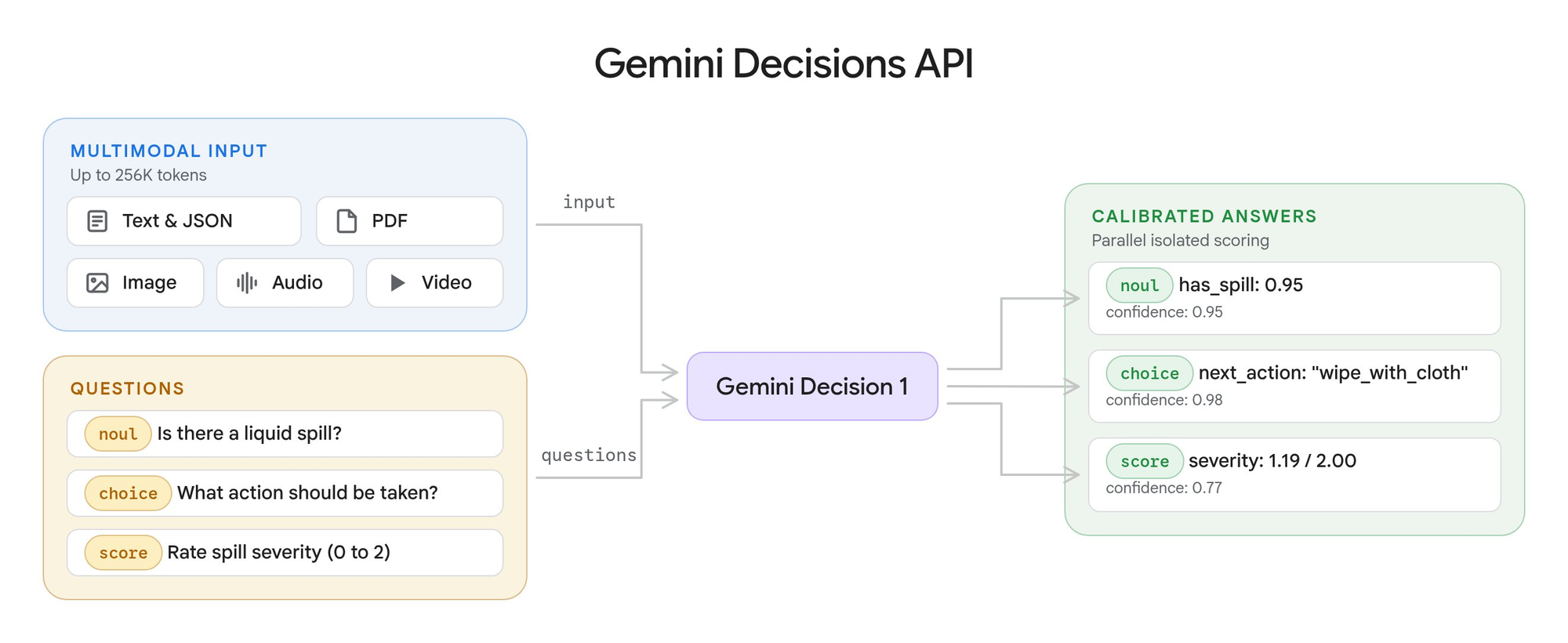
Google 于 2026 年 11 月 11 日发布了该接口。官方文档定义了三种问题类型:
| 问题类型 | 适用场景 | 返回字段 |
|---|---|---|
noul |
判断某项陈述是否成立(是/否) | noul(0.01 至 0.99)、confidence |
choice |
从 2 至 255 个选项中选出一个 | choice、probabilities、confidence |
score |
按 2 至 255 个有序等级进行评分 | score、probabilities、legend、confidence |
根据 Gemini API 定价页面,其价格为每百万输入 tokens $0.10,输出费用为 $0。无论你在一次请求中提出多少个问题,共享输入都只计费一次。如果你之前读过我们的如何使用 OpenAI Decisions API 指南,会对这种请求结构感到很熟悉,不过下面展示的字段是 Gemini 独有的命名。
第 1 步:获取 API 密钥并安装 SDK
- 打开 Google AI Studio 并创建一个 API 密钥。
- 导出环境变量:
export GEMINI_API_KEY="your-key"。 - 安装 3.2 或更高版本的 SDK:
pip install -U google-genai或npm install @google/genai@latest。
你也可以先在无需编写代码的 Decisions Playground 中在线调试问题措辞,并直接导出可运行的代码。
免费档位(2026 年 11 月 12 日核对):速率限制页面列出免费档位(Free tier)的限额为每分钟 200 次请求、每分钟 50,000 tokens 以及每天 10,000 次请求。免费档位的输入完全免费,但定价页面将该档位的数据标记为“用于改进我们的产品:是”,因此请务必在付费档位上处理真实的客户数据。关于 Google 免费配额的更多详情,请参阅我们的 Gemini API 免费档位指南。
| 档位(Tier) | 每分钟请求数(RPM) | 每分钟 token 数(TPM) | 每日请求数(RPD) |
|---|---|---|---|
| Free | 200 | 50,000 | 10,000 |
| Tier 1 | 1,500 | 1,000,000 | 50,000 |
| Tier 2 | 5,000 | 4,000,000 | 无限制 |
| Tier 3 | 15,000 | 10,000,000 | 无限制 |
第 2 步:提出第一个 noul(是/否)问题
noul 问题返回答案成立(yes)的概率。请注意 API 版本需指定为 v1beta:该端点目前尚未上线 v1。
Python:
from google import genai

client = genai.Client(http_options={"api_version": "v1beta"})

result = client.decisions.create(
    model="gemini-decision-1",
    input="The blue mug I ordered on Monday arrived cracked on Wednesday.",
    questions={
        "is_damaged": {
            "type": "noul",
            "instructions": "Did the item arrive damaged?",
        },
    },
)

answer = result.answers["is_damaged"]
print(f"P(yes)={answer.noul:.2f} confidence={answer.confidence:.2f}")
JavaScript:
import { GoogleGenAI } from "@google/genai";

const ai = new GoogleGenAI({ apiVersion: "v1beta" });

const result = await ai.decisions.create({
  model: "gemini-decision-1",
  input: "The blue mug I ordered on Monday arrived cracked on Wednesday.",
  questions: {
    is_damaged: { type: "noul", instructions: "Did the item arrive damaged?" },
  },
});

const answer = result.answers?.is_damaged;
if (answer?.type === "noul") console.log(answer.noul, answer.confidence);
REST:
curl -X POST "https://generativelanguage.googleapis.com/v1beta/decisions" \
  -H "x-goog-api-key: $GEMINI_API_KEY" \
  -H "Content-Type: application/json" \
  -d '{
    "model": "gemini-decision-1",
    "input": "The blue mug I ordered on Monday arrived cracked on Wednesday.",
    "questions": {
      "is_damaged": { "type": "noul", "instructions": "Did the item arrive damaged?" }
    }
  }'
Google 文档展示了如下响应结果(引自官方文档示例,非本文实测输出):
{
  "answers": { "is_damaged": { "type": "noul", "noul": 0.99, "confidence": 0.99 } },
  "usage": { "total_input_tokens": 100, "total_output_tokens": 0, "total_tokens": 100 }
}
当“是(yes)”的判定边界存在歧义时,可以在 criteria 中补充 true_description 和 false_description。请记住一条规则:noul 的值永远落在 0.01 到 0.99 之间,因此高于 0.99 的阈值条件永远不会命中。
第 3 步:添加单选(choice)与评分(score)问题
你可以将针对同一份输入的多个独立问题放进同一次请求中。共享输入只计费一次,每个问题仅额外叠加其自身的 token。
result = client.decisions.create(
    model="gemini-decision-1",
    input="I was charged twice for my order and the export page crashes in Safari.",
    questions={
        "department": {
            "type": "choice",
            "instructions": "Which department should handle this request?",
            "criteria": {
                "billing": "Payments, invoices, and refunds.",
                "technical": "Problems using the product.",
                "shipping": "Delivery and tracking.",
                "other": "Anything outside these categories.",
            },
        },
        "severity": {
            "type": "score",
            "instructions": "How severe is this issue for the user?",
            "criteria": [
                "Cosmetic: appearance only, no lost functionality.",
                "Workaround available: a task fails, but another way works.",
                "Fully blocked: a task fails with no workaround.",
            ],
        },
    },
)
文档中有三个细节最容易踩坑:
- 单选选项的键名(key)在打分前会按字母顺序排序。 兜底选项请使用
other,而不要使用none_of_the_above(否则它会排在真实业务选项前面)。 - 评分标准(score criteria)是一个列表,按从低到高的顺序排列并从 0 开始编号。返回的
score是按概率加权的平均值,因此可能落在两个整数等级之间(例如文档示例中给出的1.12)。 - 模型永远不会看到你自定义的问题键名。 请务必在
instructions中写出完整的问题描述。
如果想从评分结果中提取离散的整数等级,可以取概率最高的那一项:
sev = result.answers["severity"]
level = max(sev.probabilities, key=sev.probabilities.get)
print(sev.legend[level])
第 4 步:发送图像、PDF 与音频
input 参数可以接收一个字符串、单个内容块或内容块列表,其块格式与 Interactions API 完全相同。支持的内容块类型包括 text、image、audio、video 和 document(仅限 PDF)。
import base64

with open("earcup.jpg", "rb") as f:
    image_b64 = base64.b64encode(f.read()).decode("utf-8")
with open("return-form.pdf", "rb") as f:
    pdf_b64 = base64.b64encode(f.read()).decode("utf-8")

result = client.decisions.create(
    model="gemini-decision-1",
    input=[
        {"type": "text", "text": "Customer photo and form for return #8821.\n"},
        {"type": "image", "data": image_b64, "mime_type": "image/jpeg", "resolution": "low"},
        {"type": "document", "data": pdf_b64, "mime_type": "application/pdf"},
    ],
    questions={
        "visible_damage": {
            "type": "noul",
            "instructions": "Does the photo show physical damage to the device? Ignore the packaging.",
        },
        "form_signed": {
            "type": "noul",
            "instructions": "Is the return form in the PDF signed by the customer?",
        },
    },
)
对于音频输入,可以传入形如 {"type": "audio", "uri": "<https-url>", "mime_type": "audio/mp3"} 的内容块。有几项限制需要留意:
- 内联 base64 数据单次请求上限为 100 MB(PDF 上限为 50 MB);外部 URL 单个文件上限为 15 MB。
- 必须设置真实的 MIME 类型,接口会拒绝
application/octet-stream。 - 不支持 YouTube URL 和
gs://URI。请改用 Files API、公开或带签名的 HTTPS URL,或者内联字节流。 resolution(可选low、medium、high、ultra_high)用于在视觉细节与 token 消耗之间做权衡,其中ultra_high仅支持图像。
第 5 步:读取概率与置信度
每个回答都带有一个介于 0 到 1 之间的 confidence(置信度),表示模型预估最高得分答案正确的概率。对于 choice 和 score,它等于最高得分选项的概率;对于 noul,它等于 max(noul, 1 - noul)。
因此,当 noul 为 0.03 时,其 confidence 为 0.97——说明模型非常确定答案是“否(no)”。
第 6 步:将低置信度回答路由至兜底分支
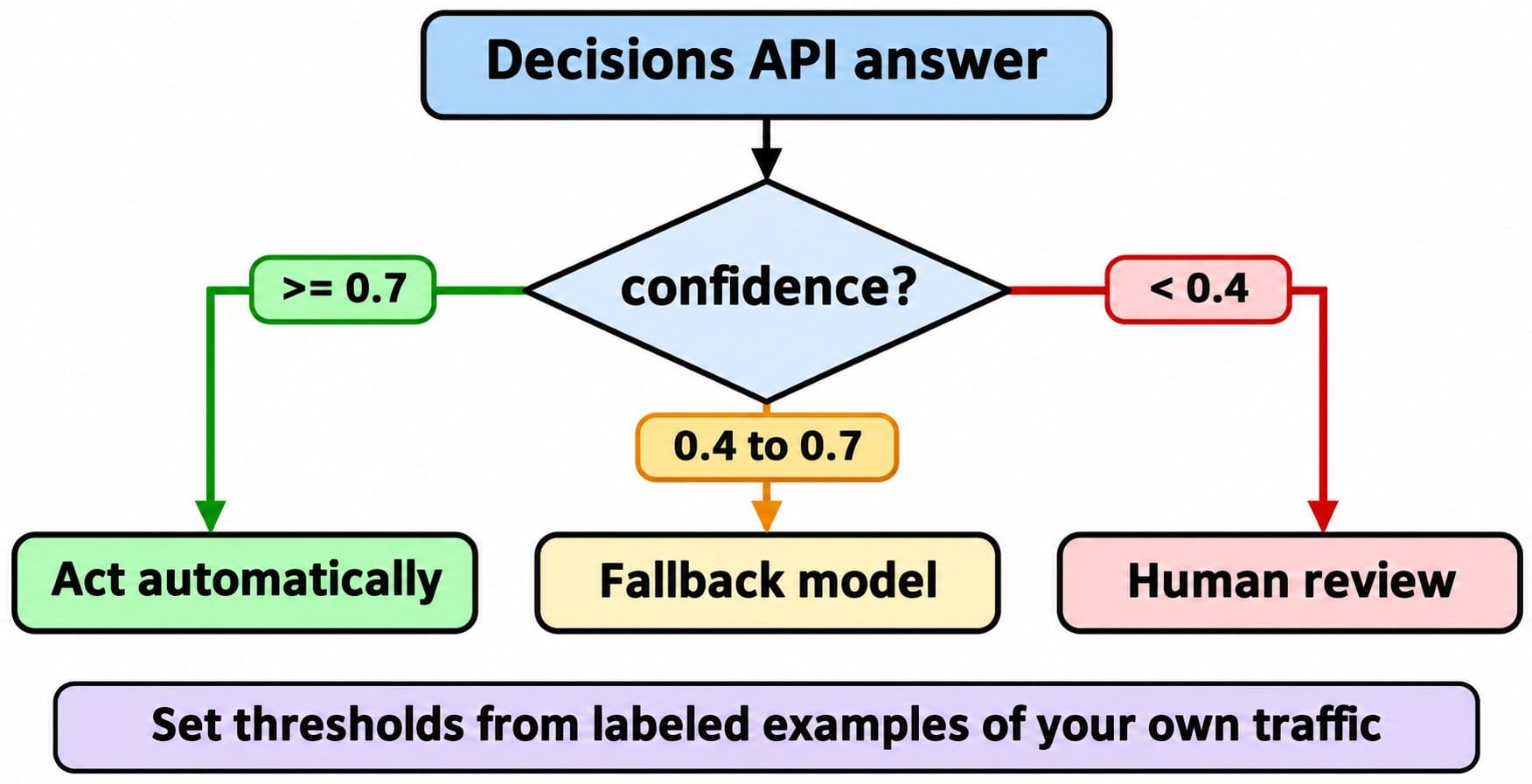
利用返回值决定执行什么动作,利用置信度决定是否自动执行:
a = result.answers
dept = a["department"]

if dept.confidence >= 0.7 and dept.choice != "other":
    route_to(dept.choice)
elif dept.confidence >= 0.4:
    route_to_fallback_model(ticket)   # 交给更大的模型进行推理判断
else:
    route_to("human_review")
上面的 0.7 和 0.4 阈值只是占位示例:Google 建议根据自有业务流量的带标注样本来确定最佳阈值。此外还有两条来自官方文档的实用准则:
- 单选问题始终会将概率分配给给定的选项,即使没有任何一个选项真正吻合。建议搭配一个范围检查问题(例如“这条消息是否与订单有关?”)共同使用。
- 将用户输入视为不可信内容。 用户发送的消息本身可能会试图诱导分类结果。对于资金打款等高风险操作,请保留人工复核或二次校验。
第 7 步:让你的编码 Agent 使用 Apifox CLI 对其进行测试
路由层的故障往往是静默发生的:某人改写了某条评估标准的措辞,导致一半工单的分类从 billing 变成了 technical,而系统却没有任何报错。解决办法是建立一套固定预期决策结果的回归测试套件,你可以让编码 Agent 配合 Apifox CLI 构建这套测试,你只需负责审阅结果。
npm install -g apifox-cli@latest
apifox auth login --with-token <YOUR_TOKEN>
npx -y skills add https://apifox.com   # 按提示选择你的 Agent
然后向你的 Agent 发送一条提示词:
In Apifox project <id>, build a test suite for POST
https://generativelanguage.googleapis.com/v1beta/decisions (header x-goog-api-key
from env var GEMINI_API_KEY). Add one request per question type (noul, choice,
score) asserting status 200, confidence between 0 and 1 and zero output tokens.
Add a test data set of 20 tickets with expected departments and assert each
choice matches with confidence >= 0.7. Run it and summarize failures.
Agent 会读取各个 payload schema、完成校验、创建测试资源并运行测试套件:
apifox cli-schema get test-scenario-create
apifox cli-schema validate test-scenario-create --file scenario.json
apifox test-scenario create --project <id> --file scenario.json
apifox test-data create --project <id> --file tickets.json
apifox test-suite create --project <id> --file suite.json
apifox run --test-suite <suiteId> --project <id> -e <envId> -d <testDataId> -r cli,junit --out-dir reports
上述每个参数均对照自 CLI 2.2.12 的 apifox run --help。现在,只要提示词或评估标准的改动导致某条测试工单的决策结果发生翻转,测试运行就会立即报错。将同一条 apifox run ... -r cli,junit 命令放进 GitHub Actions,生成的 JUnit 报告就会明确指出是哪条工单发生了翻转;完整的工作流配置见我们的 Apifox CLI CI/CD 指南,Agent 侧配置详见 Claude Code 中的 Apifox CLI 指南。Apifox 免费版不限制成员数量和协作人数。
现存限制与暂不支持的功能
根据 2026 年 11 月 12 日核对的 Decisions API 限制文档:
- 单次请求支持 1 至 1,000 个问题,共享 262,144 tokens 的上下文窗口。
- 不支持上下文缓存、不支持 Batch API、不支持 Flex 或 Priority 推理。跨请求的重复输入会全额计费。
- 触发安全拦截时会返回 HTTP 400 以及诸如
safety或prohibited_content的error.code,而不会返回答案。 - 目前仅在 Gemini Developer API(
v1beta)上提供。Google 表示 Vertex AI 支持“即将推出”,尚未公布具体日期。
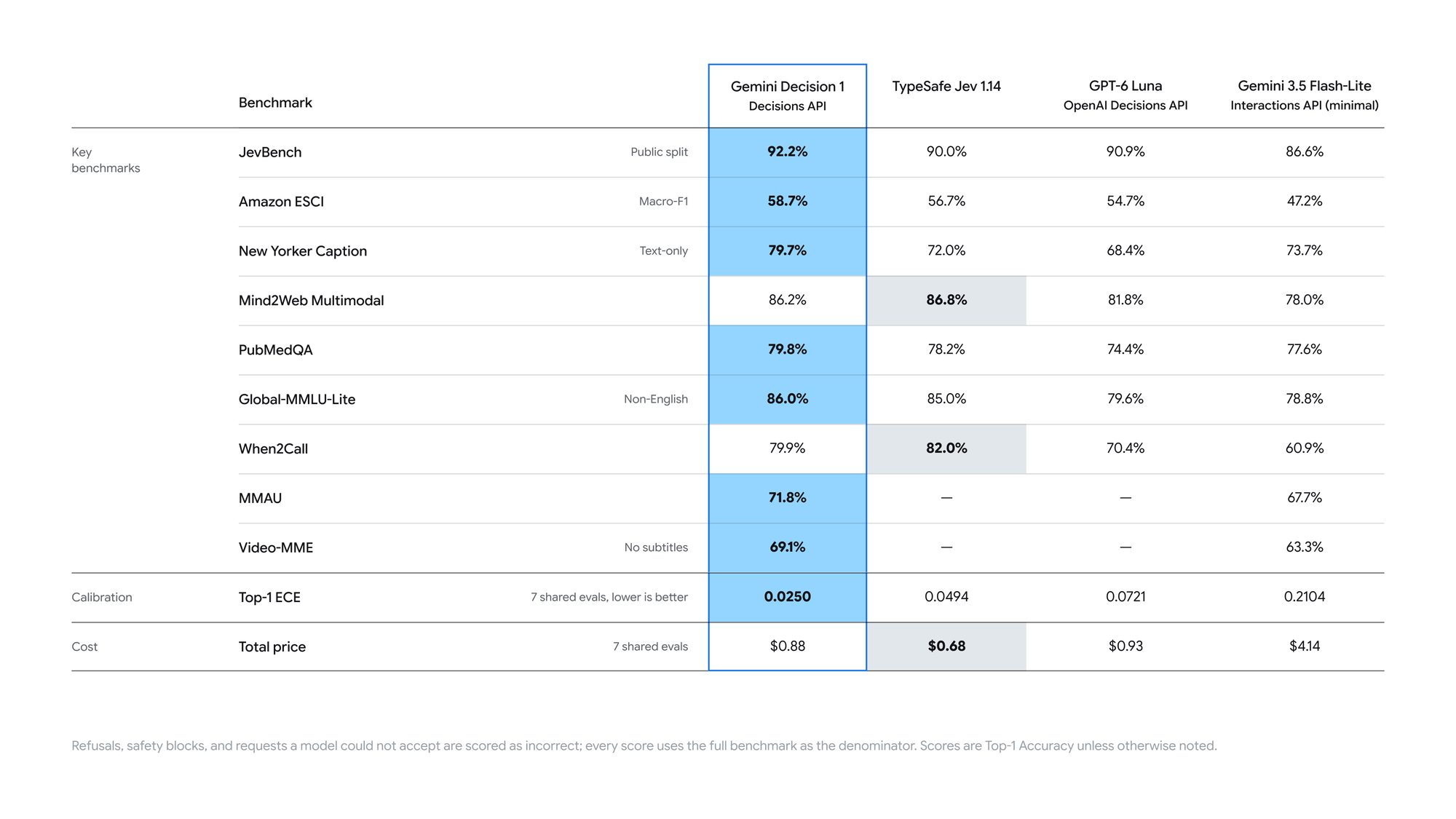
Google 报告其端到端延迟为 150 至 250 ms(对于 16K tokens 以内的输入,从 1 个问题增加到 100 个问题耗时几乎保持平稳),并表示 Gemini Decision 1 在其自建基准测试中取得了最低的校准误差。这些均属于 Google 官方数据;在围绕它们设计系统架构前,请先使用自有业务输入实测延迟表现。
常见问题
Gemini Decisions API 是免费的吗? 提供免费档位(Free tier),输入完全免费,上限为 200 RPM、50,000 TPM 和每天 10,000 次请求(2026 年 11 月 12 日核对)。免费档位的数据可能会被用于改进 Google 产品。付费档位价格为每百万输入 tokens $0.10。
noul 是什么意思? 它是该接口中的是/否(yes/no)问题类型。noul 字段代表答案成立(yes)的概率,取值范围在 0.01 到 0.99 之间。
需要使用哪个 API 版本? v1beta。在 Python 中设置 http_options={"api_version": "v1beta"},在 JavaScript 中设置 apiVersion: "v1beta",或者通过 REST 调用 /v1beta/decisions。
它支持 Vertex AI 吗? 目前还不支持。现阶段仅在 Gemini Developer API 上提供,Google 将 Google Cloud(Vertex AI)支持列为即将推出。
如何选择合适的置信度阈值? 先对几百条真实业务输入进行人工标注,通过 API 批量运行这些样本,然后找到“错误自动执行的业务代价”与“人工审核成本”相平衡的分界点作为阈值。